
AI works by using algorithms and large amounts of data to recognize patterns, make predictions, and automate tasks. In simple terms, it learns from examples, much like humans do, and then uses that learning to handle new situations.
Instead of being told exactly what to do in every case, AI figures things out by analyzing data. Over time, it becomes better at spotting patterns, making decisions, and even generating new content.
The main approaches that power AI today include machine learning, deep learning, and natural language processing, each playing a different role in how AI systems learn and work.
AI is no longer just a concept or something happening behind the scenes. It’s being built directly into tools people use to do real work. Platforms like aiwork.app take these core AI capabilities and turn them into something practical, where automating tasks and executing workflows all happen in one place.
So while the technology itself is rooted in data and algorithms, its real value today comes from how easily it can be used to get things done.
Key Takeaways
- AI learns from data and examples rather than being explicitly programmed step by step
- Most AI systems rely on machine learning, deep learning, and natural language processing to function
- AI works by identifying patterns and making predictions based on what it has seen before
- Tools like aiwork.app turn AI into something practical by helping users automate tasks and get work done faster
- Human input is still essential to guide AI, validate outputs, and handle context that it may miss
How AI Learns From Data
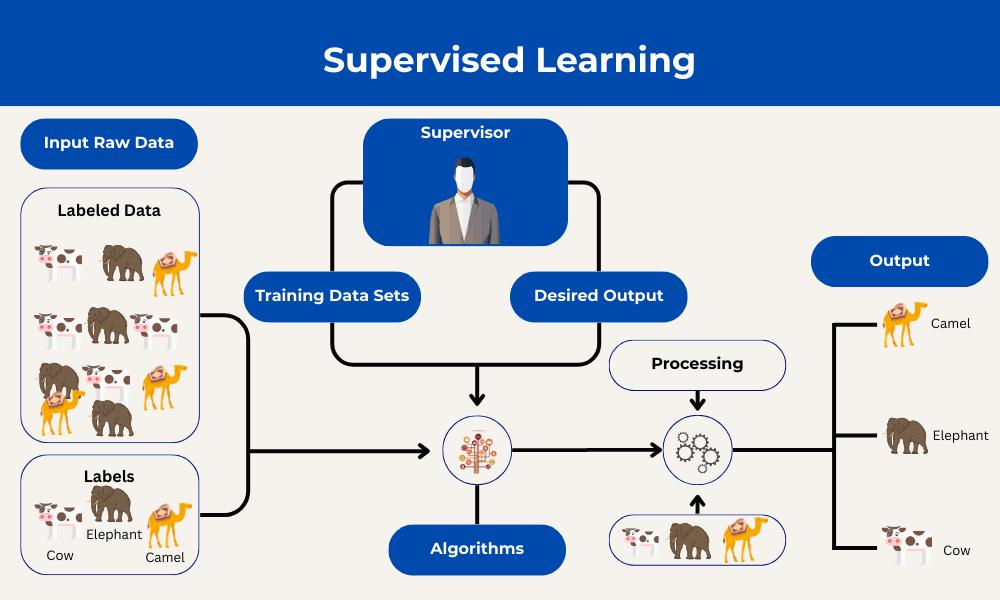
At the heart of AI is learning from data.
AI systems are trained using large datasets, which could include text, images, videos, or numbers. The system processes this information and begins to understand patterns within it.
For example:
- It learns what words usually follow each other in a sentence
- It recognizes what features make up a face in an image
- It identifies behaviors that signal fraud in financial data
Over time, this learning becomes structured into a model that can handle new inputs it has never seen before.
Key Aspects of How AI Works
Data Ingestion and Training
Everything starts with data.
AI systems take in large volumes of information and use algorithms to analyze it. During training, the system adjusts itself to improve accuracy. The more relevant and high-quality the data, the better the outcome.
This stage is where the foundation is built. If the data is poor or biased, the AI will reflect those issues.
Pattern Recognition and Prediction
Once trained, the AI begins applying what it has learned.
It identifies patterns in new data and uses them to:
- Make predictions
- Generate responses
- Solve problems
For example, a recommendation system suggests what you might like based on your past behavior, while a chatbot predicts the most appropriate response to your question.
Iterative Learning
AI is not a one-time system. It improves over time.
As it receives more data or feedback, it adjusts and becomes more accurate. This process of continuous improvement is what makes AI increasingly useful in real-world applications.
Some systems are retrained periodically, while others learn continuously through interaction.
Core Technologies Behind How AI Works
Machine Learning
Machine learning is the foundation of modern AI.
Instead of being programmed with fixed rules, systems learn from data and improve over time. The more data they process, the better they perform.
Deep Learning
Deep learning is a more advanced form of machine learning.
It uses neural networks with multiple layers to process complex data. This allows AI to handle tasks like:
- Speech recognition
- Image classification
- Language generation
Natural Language Processing (NLP)
NLP allows AI to understand and generate human language.
It helps systems:
- Interpret meaning
- Understand context
- Respond naturally
This is what powers chatbots, virtual assistants, and AI writing tools.
Computer Vision
Computer vision enables AI to interpret visual information.
It allows systems to:
- Recognize objects in images
- Analyze video footage
- Support technologies like self-driving systems
Common Applications of AI
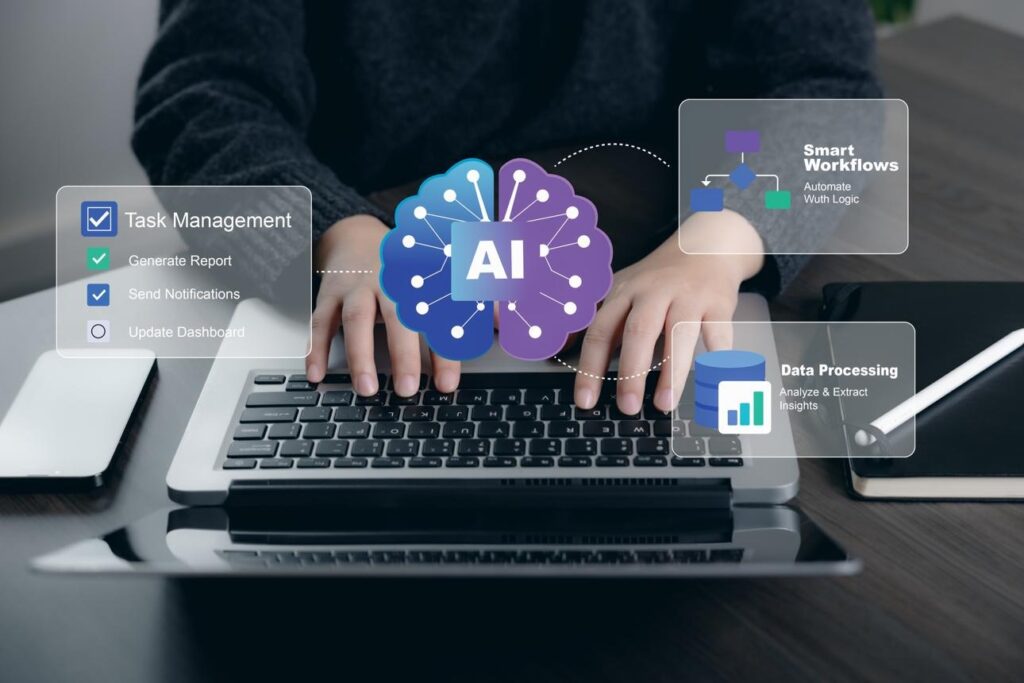
AI is already part of everyday life, even if it’s not always obvious.
Generative AI (Gen AI)
Generative AI creates new content rather than just analyzing existing data.
This includes:
- Writing text
- Generating images
- Producing code
- Creating audio
Tools powered by large language models can generate human-like responses, making them useful for content creation, customer support, and more.
Automation and Operations
AI is widely used to handle repetitive and time-consuming tasks.
Examples include:
- Resetting passwords
- Managing application access
- Processing forms and documents
- Handling routine customer service queries
This frees up time for people to focus on more strategic work.
Recommendations and Personalization
AI systems analyze user behavior to deliver personalized experiences.
You see this in:
- Streaming platforms suggesting movies
- Online stores recommending products
- Social media curating content feeds
These systems learn what you like and adjust accordingly.
Data Analysis
AI can process large and complex datasets much faster than humans.
It helps organizations:
- Identify trends
- Forecast outcomes
- Make better decisions
This is especially valuable in industries like finance, healthcare, and marketing.
Human-in-the-Loop
Even with advanced capabilities, AI still benefits from human involvement.
Humans play a key role in:
- Reviewing outputs
- Correcting errors
- Providing context
- Ensuring ethical use
This collaboration helps keep AI systems accurate and reliable.
AI in the Workplace
AI is changing how work gets done across industries.
Instead of relying heavily on manual processes, organizations are adopting AI-driven workflows that improve speed and efficiency.
Automation
AI handles repetitive tasks that would otherwise take up valuable time.
This includes:
- Data entry
- Document verification
- Customer support queries
Generative AI
AI tools are now capable of creating content, which is transforming both creative and technical work.AI is also making it possible to turn creative ideas into finished products, with generative tools helping businesses and individuals move from simple prompts to practical outputs.
Teams can:
- Generate drafts quickly
- Build prototypes faster
- Reduce time spent on routine tasks
Decision Support
AI helps professionals make better decisions by analyzing data and presenting insights clearly.
It can:
- Highlight trends
- Identify risks
- Suggest next steps
Autonomous Agents
AI systems are becoming more capable of handling multi-step workflows.
These systems can manage processes across:
- IT operations
- Legal tasks
- Human resources
They are still evolving but already showing strong potential.
Skills and Roles to Work With AI
As AI adoption grows, so does the demand for people who understand how to work with it.
Key Roles
Some of the most in-demand roles include:
- Machine Learning Engineer
- Data Scientist
- AI Software Developer
- Computer Vision Engineer
- AI Consultant
Emerging Roles
New roles are also emerging as AI becomes more integrated into everyday work.
One example is the AI Prompt Engineer, who focuses on guiding AI systems effectively using structured inputs and creative problem-solving.
Required Skills
To work effectively with AI, professionals typically need:
- Programming knowledge (especially Python)
- Understanding of data structures and algorithms
- Familiarity with neural networks
- Domain-specific expertise
AI Benefits and Considerations
AI brings clear advantages, but it also comes with important challenges.
Benefits
AI can:
- Increase productivity
- Improve efficiency
- Enhance safety in certain environments
- Handle complex tasks at scale
It allows individuals and organizations to do more with less time and effort.
Risks and Considerations
At the same time, there are important concerns to keep in mind:
- Bias in AI systems due to training data
- Job displacement in some industries
- Data privacy and security issues
- Dependence on high-quality data
Understanding both the benefits and the risks is key to using AI responsibly.
In the end, AI is not about replacing humans. It’s about extending what humans can do, helping us work faster, think deeper, and solve problems more efficiently.
Best AI Work Apps (That Actually Help You Get Things Done)
There’s no single “best” AI app for work. It depends on what you’re trying to improve.
Some tools help you write. Others automate tasks. Some act like assistants. The real value comes from combining the right ones into your workflow.
Let’s break this down in a practical way.
All-in-One AI Work Platforms
These are tools that try to handle multiple parts of your workflow in one place.
aiwork.app
You should pay attention to aiwork.app if you’re looking for a central AI workspace, not just another tool.
Instead of juggling 5–10 different apps, AIWork focuses on bringing AI capabilities into one system where you can:
- Run tasks
- Automate workflows
- Generate content
- Execute work faster
What makes it different is the “work-first” approach. It’s not just chat-based. It’s built around actually getting tasks done.
If you’re building systems, running a business, or managing operations, this type of tool is more useful than isolated AI apps.
Notion AI
A strong all-in-one workspace.
- Combines docs, tasks, databases, and AI
- Can summarize notes, generate content, and automate workflows
- Let’s you build internal knowledge systems
It’s especially useful for teams trying to centralize everything in one place.
Microsoft 365 Copilot
If you already use Word, Excel, or Outlook, this is a natural upgrade.
- Writes documents and emails
- Analyzes spreadsheets
- Summarizes meetings
- Integrates directly into your workflow
It works by connecting your company data and turning it into insights inside the tools you already use.
AI Writing & Content Tools
If your work involves writing, these tools save serious time.
ChatGPT
- Brainstorming
- Drafting content
- Explaining ideas
- Summarizing information
It’s still one of the most versatile tools for everyday work.
Grammarly
- Fixes grammar
- Improves clarity
- Adjusts tone
It’s less about generating content and more about refining it.
Type.ai
- Helps create first drafts quickly
- Can rewrite and refine content
- Adapts to your writing style
Great for getting started when you’re stuck.
AI Automation & Workflow Tools
These are where real productivity gains happen.
Zapier
- Connects apps together
- Automates repetitive workflows
- Reduces manual work
It’s one of the most widely used automation tools for teams.
Reclaim AI
- Auto-schedules your day
- Protects focus time
- Balances meetings and tasks
Think of it as an intelligent calendar manager.
Todoist AI Assistant
- Breaks tasks into steps
- Suggests improvements
- Helps you actually execute
Simple, but very effective for daily work.
AI Search & Knowledge Tools
These help you think faster and find answers quicker.
Perplexity AI
- Answers questions with sources
- Faster than traditional search
- Good for research
Claude
- Strong reasoning
- Better for deeper thinking tasks
- Handles long documents well
Often preferred for more structured work.
AI Meeting & Communication Tools
Otter.ai
- Transcribes meetings
- Summarizes conversations
- Highlights key points
Saves hours of manual note-taking.
Voice AI tools (like VoiceType)
- Convert speech to text
- Speed up writing
- Useful for meetings and brainstorming
Some tools reach very high accuracy and speed, making them practical for daily workflows.
What Actually Matters When Choosing an AI Work App
Don’t just pick tools because they’re popular.
Focus on:
- What task are you trying to eliminate or speed up?
- Does it fit into your current workflow?
- Does it replace multiple tools or just add another layer?
The biggest mistake people make is stacking too many AI tools without a system.
Simple Recommendation (If You Want to Keep It Lean)
If you want a clean setup:
- Use aiwork.app as your core workspace
- Add ChatGPT for thinking and content
- Use Notion AI or Microsoft 365 Copilot, depending on your ecosystem
- Layer in automation with Zapier
That’s already more than enough for most people.
FAQs
How does AI actually learn?
What is the difference between AI and machine learning?
Can AI think like humans?
Where is AI used in everyday life?
Is AI going to replace jobs?
Final Thoughts On How AI Works
If you strip everything back, AI is still built on a simple idea: it learns from data, spots patterns, and uses those patterns to make decisions or predictions. That hasn’t changed.
What has changed is how that capability is being used.
AI is no longer just something running quietly in the background of big tech systems. It’s now packaged into everyday tools people use to actually get work done. From writing and analysis to automation and decision-making, AI is becoming part of daily workflows.
That’s why tools like aiwork.app and similar platforms are gaining attention. They don’t just show what AI can do; they turn it into something practical. Instead of switching between multiple tools, you can start using AI as part of a single workflow where tasks, content, and execution come together.
But even with all this progress, one thing stays true: AI doesn’t think. It processes. It predicts. And sometimes, it gets things wrong.
It can reflect bias, miss context, or sound confident without being correct. That’s why human input still matters. You’re not being replaced. You’re the one guiding the system, deciding what’s useful, and applying judgment where AI can’t.
The real shift happening now isn’t AI replacing people. It’s people learning how to work with AI effectively.
Those who understand how it works, even at a basic level, will get more value out of it. They’ll use it to move faster, think more clearly, and build better systems around their work.
In the end, AI is still just a tool. A powerful one, yes. But its impact depends on how you use it and how well it fits into the way you work.